When a client in Qatar hands a .NET project to a remote outsourced developer, the first question that should come up isn't "when will it be done?" — it's "how will I know it's working correctly before it reaches production?" That's exactly what a CI/CD pipeline answers.
What CI/CD Actually Means
Continuous Integration (CI) means every code change is automatically built and tested the moment it's pushed to the repository. Continuous Deployment/Delivery (CD) means a change that passes those tests is automatically packaged and released — either straight to production or to a staging environment awaiting approval.
For an outsourced engagement, this matters more than usual: the client isn't standing behind the developer's desk watching the code get written. The pipeline becomes the trust mechanism — every commit is independently verified, not just "trust me, it works on my machine."
A Typical .NET Pipeline, Stage by Stage
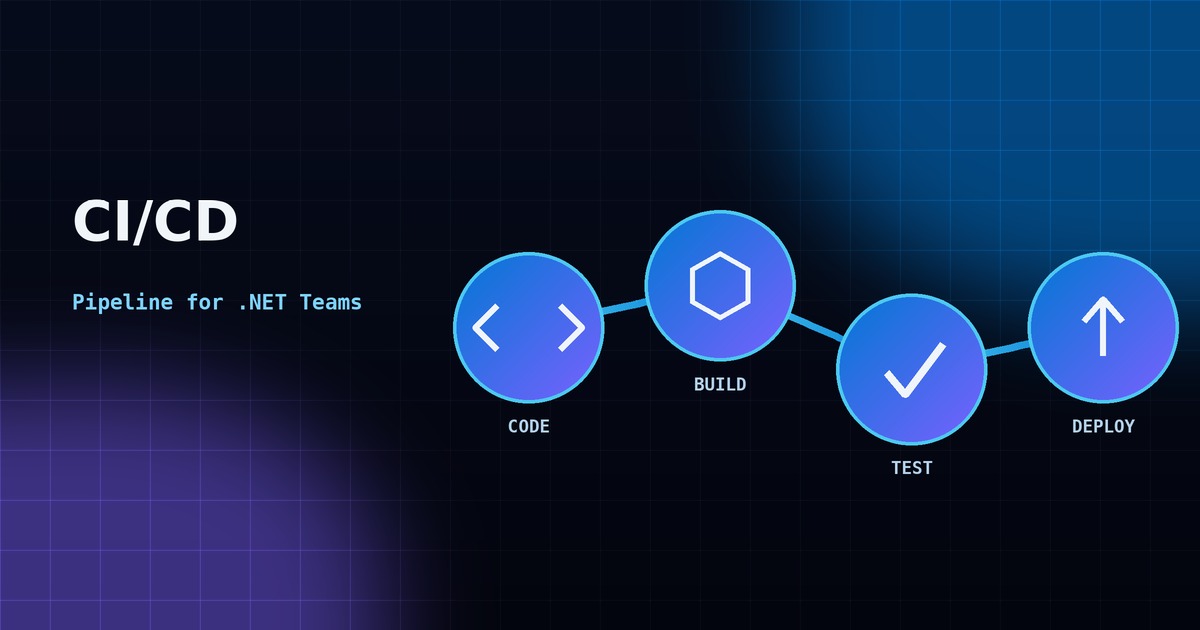
- Code — a developer pushes a commit to a feature branch and opens a pull request.
- Build — the pipeline restores NuGet packages and compiles the solution (
dotnet build), catching compilation errors before anyone reviews the code. - Test — unit and integration tests run automatically (
dotnet test), blocking the merge if anything fails. - Deploy — on merge to the main branch, the pipeline publishes the app and deploys it to Azure App Service, a container registry, or another target environment.
A Minimal GitHub Actions Workflow
name: dotnet-ci

on:
  push:
    branches: [ main ]
  pull_request:
    branches: [ main ]

jobs:
  build-and-test:
    runs-on: ubuntu-latest
    steps:
      - uses: actions/checkout@v4
      - uses: actions/setup-dotnet@v4
        with:
          dotnet-version: '8.0.x'
      - run: dotnet restore
      - run: dotnet build --no-restore --configuration Release
      - run: dotnet test --no-build --verbosity normal
This is intentionally simple — restore, build, test. Deployment steps (publishing to Azure App Service, pushing a Docker image, or running database migrations) get added once the core pipeline is green and stable.
Why this matters for outsourcing: a working pipeline gives a client visibility into code quality without needing to read every line themselves. A green checkmark on a pull request is a small thing, but it's the difference between "I hope this works" and "this is verified."
Azure DevOps vs GitHub Actions for .NET
Both work well for .NET projects. Azure DevOps Pipelines integrate tightly with Azure App Service and Azure SQL, and are a natural fit if the target deployment environment is already Azure. GitHub Actions is often simpler to set up for smaller projects and works well when the codebase already lives on GitHub.
Neither choice is wrong — what matters is that a pipeline exists at all, and that it runs on every single change, not "when someone remembers to test manually."
Common Pipeline Mistakes to Avoid
- No automated tests — a pipeline that only builds (and never tests) catches compile errors but not logic errors.
- Secrets committed to source control — connection strings and API keys belong in a secrets manager (Azure Key Vault, GitHub Secrets), never in
appsettings.json. - No staging environment — deploying straight to production on every merge is risky; a staging slot lets you verify first.
- Skipping database migration automation — manual schema changes are one of the most common causes of "it worked in dev but broke in production."
Why This Matters When You're Outsourcing to Qatar's GCC Time Zone
For Qatar-based businesses outsourcing to a remote India-based developer, a CI/CD pipeline closes the trust gap that distance and time zones can create. Instead of waiting for a daily stand-up to hear "it's done," a client can watch a pull request get automatically built, tested and deployed — often before the next stand-up even happens. It's one of the simplest ways an outsourced .NET engagement can feel as transparent as an in-house one.